
What is UI coverage?
playwright-ui-coverage tells you which parts of your user interface your Playwright end-to-end tests actually use. After a test run you get an HTML report with a screenshot of every page your tests visited, each button, link and input outlined in green (a test used it) or red (no test did), a coverage percentage per page, and the list of tests that touched each element.
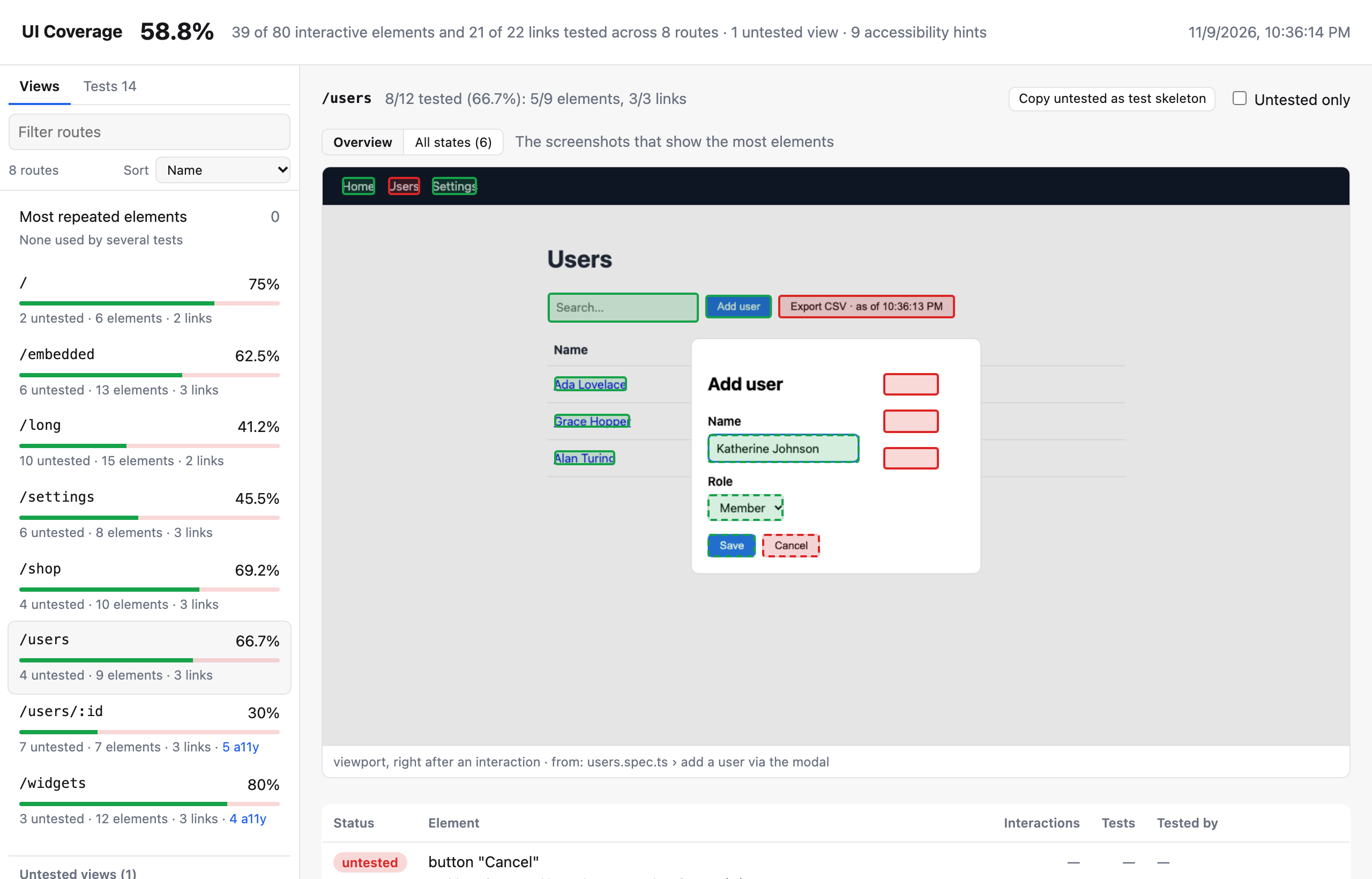
Why measure the UI, not the code
Code coverage answers "which lines of code ran?". In an end-to-end test that's a weak signal: loading a page runs most of its code, whether or not a test clicks anything on it. A settings page can show 90% line coverage while no test ever changes a setting.
UI coverage answers a question closer to what an E2E suite is for: which controls a user can see did a test actually operate? It counts the things a user can interact with (buttons, links, form fields, tabs, menu items, anything focusable) and marks each one tested only when a test clicked it, typed into it, submitted it, dragged it, or (for links) reached the page it leads to.
| Code coverage | UI coverage | |
|---|---|---|
| Unit | lines, branches, functions | interactive elements and links, per page |
| "Covered" means | the code ran | a test interacted with the element, or visited the page a link goes to |
| Rendering a page | covers most of its code | covers nothing until a test uses a control |
| Output | source files with highlighted lines | screenshots of your app with highlighted controls |
| Setup | often an instrumented build or source maps | one import in the Playwright config; nothing changes in your app |
The two are complementary: code coverage finds logic no test reaches, UI coverage finds features no test exercises.
What you get
- Every page your tests visit, with each interactive element marked. Dynamic URL segments are grouped into views (
/users/1,/users/2→/users/:id). See Reading the report. - The gaps, with the code to close them. Each untested element has a ready-to-paste Playwright line, and each view a test skeleton. See Suggested locators and accessibility hints.
- Every state, every step. Step through each state a page reached, or replay a single test action by action, with the Playwright call, its line in the spec and a screenshot of the element it acted on. See Step through every state and Walk through a test.
- Links counted by where they go. A link is tested when a test reached its destination, by any path, and pages no test reached at all are listed as untested views. See Links and untested views.
- CI gates. Thresholds per view, a baseline that fails only on new untested elements, and a comparison with
mainfor PR comments. See CI. - A machine-readable
coverage.json, versioned and with a JSON Schema. See coverage.json.
How it fits into Playwright
The library records while your tests run and adds a reporter that builds the report afterwards:
- Recording runs in every browser context your tests create, either from one import in
playwright.config.ts(register mode) or as a fixture you merge into your owntest(fixture mode). It adds no steps to your HTML report or trace. - The reporter (
playwright-ui-coverage/reporter) merges the data from all workers and writesui-coverage-report/. It works with retries, sharding andmerge-reports, and with component tests. - Rules are applied at report time, so you can change filters, views and identity rules and rebuild the report from the stored data without running the tests again. See How it works.
Ready? Continue with Getting started.
NOTE
Status: early development (0.x). APIs may change. Supports @playwright/test 1.50 or later, see Compatibility.