
Suggested locators and accessibility hints
This page explains the ready-to-paste Playwright line the report suggests for each untested element, the test skeleton per view, and the informational accessibility hints.
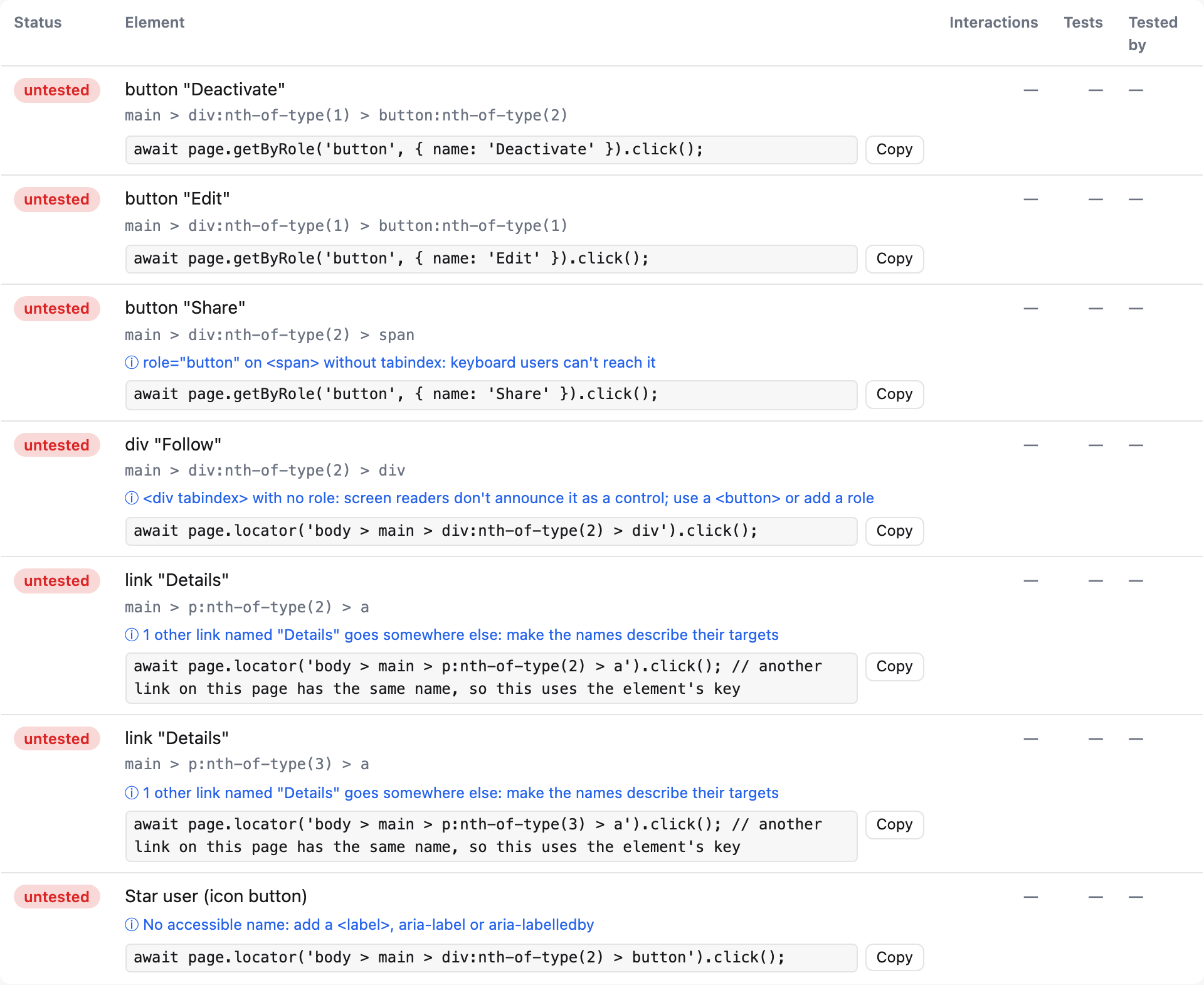
Suggested locators
For every element, coverage.json has a suggestedLocator: one line of Playwright code that interacts with it. The report shows it (with a Copy button) for untested elements. It's built from the recorded data, deterministically, picking the first that applies:
page.getByTestId('…')if the element has the test id attribute. That'suse.testIdAttributefrom your Playwright config (or the reporter'stestIdAttributeoption), defaultdata-testid. An attribute that doesn't start withdata-is only recorded if it's insignificantAttributes.- If the accessible name changed between runs or instances (the label shows
(+N variants)), or another element with the same role has the same name on this view:page.locator('<key>'), the element's key as a CSS selector. page.getByRole(role, { name }). Names from attributes and<label>s match exactly (exact: true); names from text content match like Playwright's default (case-insensitive substring), or as/^…$/iwhen that would also match a longer name on the view ("Save" and "Save draft").page.getByLabel(…),page.getByPlaceholder(…),page.getByTitle(…),page.getByText(…)when the name came from there and there's no usable role (a placeholder or title as the only name always uses these).page.locator('<key>')otherwise. Positional keys get abody >prefix.
Elements inside iframes get the same locator, starting from page.frameLocator('<frame key>') (once per nested frame).
The action follows the element: click() for buttons and links, fill('…') for text fields (with a sample value for email, number, date… inputs), check() for checkboxes, radios and switches, selectOption('…') for <select>, setInputFiles('path/to/file') for file inputs. Repeated elements (×3) get .first() and a comment on how to narrow it.
Untested links get a page.getByRole('link', { name })…click() line in the Links table.
Test skeleton
Copy untested as test skeleton produces (shortened):
test('covers untested elements on /settings', async ({ page }) => {
  await page.goto('/settings');
  // TODO: a line that navigates away (link, submit) ends this page state: split into more tests or goto() again.
  await page.getByTestId('delete-account').click();
  // TODO: assert the result
  await page.getByRole('textbox', { name: 'Bio', exact: true }).fill('…');
  // TODO: assert the result
});
If the browser blocks clipboard access (some do for file:// pages), the text opens in a dialog, selected, to copy by hand.
Limits
Suggestions are a starting point. Elements inside a closed dialog or menu need the steps that open it first, and a name with per-run text (a timestamp, a counter) that a run saw only once can't be detected as changing.
Accessibility hints
Informational only: they don't change the coverage score or fail a run. The report shows them in blue under the element, with a count per view; coverage.json has a11yHints: [{ rule, message }] on elements that have any, and an a11yHintsCount per view and in total. The console summary prints the count (9 accessibility hint(s), informational).
| Rule | When |
|---|---|
no-name | The control has no accessible name: no <label>, aria-label(ledby), title, alt or (for buttons and links) text. A name attribute or a <select>'s options don't count. |
placeholder-only | A field is named only by its placeholder. |
duplicate-name | Links on the same view with the same name (case-insensitive) but different hrefs, e.g. several "Read more". |
not-focusable | An ARIA role on an element that isn't focusable (<div role="button"> without tabindex). |
no-role | A plain element counted as interactive because of its tabindex or data-uicov-interactive="include", with no role: screen readers don't announce it as a control. |
What it can't see: elements that are clickable only through a JS handler and have no role, tabindex or data-uicov-interactive (they aren't recorded at all), instances that share a key (only one instance's href is recorded, so a "View" link on every table row isn't compared), and names the browser computes differently from the tracker's approximation. For a full audit, use a dedicated accessibility testing tool such as axe.
What the suggestions are built from
Each element's role, accessible name and nameFrom are recorded, and coverage.json lists them with the element's identifying attributes (attrs: id, name, role, type, aria-label, href, tabindex, contenteditable, data-* and your significantAttributes). See coverage.json.